
Sometimes it says Sparkasse, sometimes Volksbank, sometimes Commerzbank: fake bank emails land in people's inboxes all the time. Most of them want the same thing, namely your online banking login details. And they're all very similar.
A fresh example landed in my inbox overnight into November 4, supposedly from Commerzbank. Subject: “Aktualisierung Ihrer Kontoinformationen erforderlich” (Account information update required). It claimed there were discrepancies in my account details and that I should confirm them via a link. Otherwise my account would be blocked in 24 hours. The email is fake. The link doesn't lead to Commerzbank, and anyone who “confirms” their details there is handing them to the scammers.
Using this email, I'll show you how to spot fake bank emails, no matter which name is on them. Even more important: how to act so that even a perfect fake can't hurt you. At the very bottom, there's a cheat sheet to pass on.
The example: the fake Commerzbank email
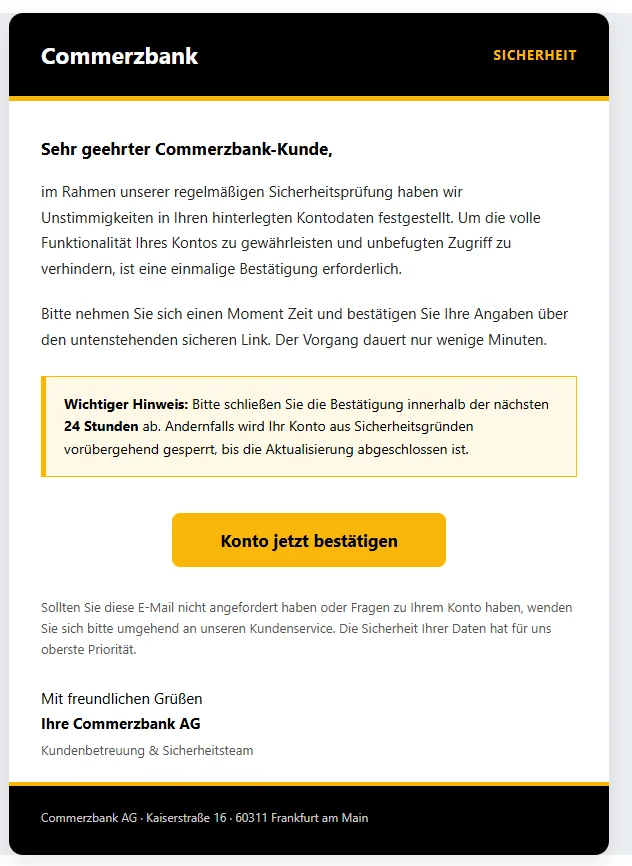
Here's what it looked like. In the link, I put the dot before “ae” in square brackets so nobody clicks on it by accident.
Subject: Aktualisierung Ihrer Kontoinformationen erforderlich (Account information update required)
From: Commerzbank AG,office@technik-point.atDear Commerzbank customer,
As part of our regular security check, we have found discrepancies in your stored account details. To ensure the full functionality of your account and to prevent unauthorized access, a one-time confirmation is required.
Please take a moment to confirm your details via the secure link below. The process only takes a few minutes.
Important notice: Please complete the confirmation within the next 24 hours. Otherwise, your account will be temporarily blocked for security reasons until the update has been completed.
Yellow button “Confirm account now”, the link behind it:
https://dgt-gob-sede-es.smarths[.]ae/servicedeIf you did not request this email or have any questions about your account, please contact our customer service immediately. The security of your data is our top priority.
Kind regards,
Your Commerzbank AG
Customer Service & Security TeamCommerzbank AG · Kaiserstraße 16 · 60311 Frankfurt am Main
Seven warning signs in this email
- The sender doesn't match. The name says “Commerzbank AG”, but the address behind it is
office@technik-point.at. The ending .at stands for Austria. The address has nothing to do with Commerzbank. Anyone can type any name they like in front of the address, and many email apps only show that name. Tap the name (on your phone) or hover your mouse over it (on a computer), and you'll see the real address. Then again, an address that looks genuine doesn't prove anything either. - The link goes somewhere else. The “Confirm account now” button doesn't lead to
commerzbank.de, but to an address ending in .ae. That stands for the United Arab Emirates. The front part “dgt-gob-sede-es” resembles the website of Spain's traffic authority. You'll find out how to read an address like this further down. - Time pressure and a threat. “Within the next 24 hours”, or else the account gets blocked. If you're worried about your account, you check less carefully. That's exactly what scammers count on.
- The reason stays vague. “Discrepancies in your stored account details”: Which ones? The email doesn't say. It gives no customer number, no account number and no specific case.
- No personal greeting. “Dear Commerzbank customer”: The scammers don't know your name. They send the same email to a huge number of addresses and hope that a few of the recipients really are customers of this bank. Then again, an email with your name in it isn't automatically genuine. Names and addresses often come from data leaks.
- Only one way: the button. No reputable bank asks you by email to confirm your details via a link. Calling the link explicitly “secure” is meant to reassure you. The email does refer you to customer service, but it doesn't give a phone number for it. The only way it offers you is the button.
- The tech sounds the alarm. You won't see this at first glance. But in the top section of the email, the so-called header, it says
spf=fail. That means the server that sent the email isn't even allowed to send emails for this sender address. So the address is forged or misused. Spam filters often catch emails like this, but not always.
You'll find the same signs in fake emails that say Sparkasse, Volksbank or another bank's name. Only the name, colors and logo change.
To be fair: the domains technik-point.at and smarths[.]ae don't necessarily belong to the scammers. Scammers often fake other people's sender addresses or put their pages on hacked servers. The owners are then victims themselves.
Don't let this fool you
Some things about this email look genuine. None of them prove anything:
- Flawless German. Scammers often used to give themselves away with clumsy German. Today, translation tools and AI produce clean text in seconds. This email doesn't contain a single spelling mistake. The old tip to look out for mistakes hardly helps anymore.
- A real postal address. At the bottom it says Kaiserstraße 16 in Frankfurt. That really is a Commerzbank address. It's public, anyone can copy it.
- Tidy design. Black and yellow, a notice box, a big button. Any bank's colors and logo are easy to copy, and the same goes for Sparkasse's red.
- Reassuring sentences. “The security of your data is our top priority.” That sounds trustworthy and costs nothing.
So an email can look perfect and still be fake. That's why the rule in the next section matters more than any warning sign.
The most important rule: never log in through a link
You don't have to spot a fake if you stick to one rule: Never log in through a link in an email or text message. No matter how genuine it looks.
Always take the direct route:
- Type your bank's address into the browser yourself.
- Or use a bookmark you created yourself.
- Or open your bank's official app.
If your bank really wants something from you, you'll see it there. Important messages are usually also in the inbox of your online banking. If you can't find anything there and you're still unsure, call your bank. If the email was genuine after all, the detour hasn't cost you anything.
Also, don't look up your bank through a search engine every time. Above the real results there are often ads, and scammers buy ads like that too. They lead to fake login pages. Bookmarks and the app are safer.
A password manager helps too. It only fills in your login details on the real site. If it suddenly offers you nothing on a login page, even though it always does otherwise, that's a red flag.
How to read a web address
Sometimes you do want to check an address, for example with a QR code or a link in a text message. Then this rule helps: Look for the first single slash (/) after the “https://”. Right before it are the ending, such as .de, and the word in front of that. These two parts tell you who the site belongs to. Everything further to the left can be chosen freely.
The example from the email:
https://dgt-gob-sede-es.smarths[.]ae/servicede
The first single slash comes after “ae”. Right before it is smarths[.]ae, and that's who the site belongs to. Whoever controls the domain can make up the front part “dgt-gob-sede-es”. Here it's meant to look like a government authority.
A made-up example: https://sparkasse.de.beispiel-betrug.com/login. Here the first single slash comes after “com”. So the site belongs to beispiel-betrug.com, not to Sparkasse.
For your bank, that spot has to show exactly its address, for example commerzbank.de for Commerzbank. Sparkasse and Volksbank banks often have their own address for their region. Remember your bank's address, or even better: create a bookmark.
Also watch out for similar names. One extra hyphen, a zero instead of an O or a different ending, and the site already belongs to someone else.
What your bank never asks for
No reputable bank will ask you by email, text message, messaging app or phone:
- for your password or your PIN
- for a TAN (the one-time code that approves a transaction), no matter what it's for
- to confirm your details via a link
- for a photo or a copy of your activation or registration letter for the TAN procedure, for example for photoTAN or pushTAN
- to install an app via a link
- for remote access to your computer or your phone
If someone wants any of these, it's a scam. Even if they introduce themselves as a bank employee, police officer or technician.
The TAN is your signature
Many scammers don't get far with your password alone. They also need an approval from you. So they use your login details to start a transfer or register a new device. Your phone then shows a request to approve it. Often they call you at the same time and claim you need it to “cancel” or “secure” something.
Treat every approval like a signature:
- Only approve what you've just started yourself.
- Read the whole request: amount, recipient, type of order.
- If it shows a new device, a card for paying with your phone or an amount you don't recognize: reject it.
- Never tell anyone a TAN over the phone. Not even your bank.
One tap to approve is all it takes, and the order goes through.
Call, text message, letter: same scam
Phishing also comes by phone, by text message and even by letter. The rules stay the same.
- Calls: The number on your display can be faked. Even if it shows your bank's real number, a scammer can be on the line. Hang up and call them yourself. You'll find the number on your bank's website, which you type in yourself, or in its app.
- Text messages and messaging apps: Here too, you never log in through a link.
- Letters with a QR code: There are fake letters whose QR code leads to a supposed update. Commerzbank, for example, warns about this itself. Don't scan a code that takes you to a login. Log in yourself instead and take a look.
- Fake blocking hotline, fake police: Scammers even make 116 116 or 110 show up on your display. 116 116 is the German emergency blocking hotline (Sperr-Notruf), 110 is the German police emergency number. The real Sperr-Notruf doesn't call anyone from 116 116, and the police don't call from 110. You call these numbers, not the other way around.
Already clicked? Here's what to do now
Only opened the link and didn't enter anything? Close the page. Usually nothing has happened then. If the page downloaded a file, don't open it. Delete it.
Entered your details or approved something? Then every minute counts:
- Call your bank right away. Get the number from the website whose address you type in yourself, or from the app.
- Have your online banking blocked. At participating banks, you can also do this around the clock through the German emergency blocking hotline (Sperr-Notruf) 116 116. From abroad, you can reach it at +49 116 116 or +49 30 4050 4050.
- Check your account activity and report any transaction you don't recognize to your bank.
- Then change your login details. If you've used the same password anywhere else, change it there too.
- File a report with the police, for example through your German state's online police station (Onlinewache or Internetwache).
Report the phishing email
Even if you didn't fall for it: report the email. That helps warn others faster.
- Forward it to Verbraucherzentrale NRW (the consumer advice center of North Rhine-Westphalia): phishing@verbraucherzentrale.nrw. These reports are used to build the Phishing-Radar with current warnings.
- Many companies also accept fake emails sent in their name themselves. You'll find the address for that on their website.
- After that: move it to your spam folder or delete it. Don't reply.
Cheat sheet to pass on
Feel free to send this part to your parents, grandparents and friends:
- Never log in through a link or QR code from an email, text message or letter. Use your bookmark or the app.
- Look at the real sender address, not just the name.
- Time pressure and threats are red flags.
- Good German and a nice logo prove nothing.
- Never give your password, PIN or TAN to anyone. Not even to your bank.
- In the banking app, only approve what you started yourself.
- When in doubt, hang up and call the bank yourself.
- Already happened? Call your bank or the German emergency blocking hotline (Sperr-Notruf) 116 116 right away.