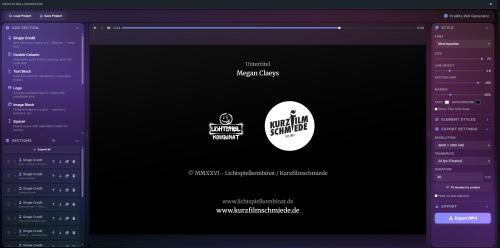
Credits Roll Generator — Big Update
The Credits Roll Generator just received its largest update yet, packed with improvements that came directly from your feedback. Here is what's new:
Two New Section Types
- Cast with Photos. Show your team or cast with headshots: photo, name and role arranged in a clean grid. Choose round or rectangular photos and adjust the number of photos per row, their width and height, and the spacing between them — from generous gaps to a seamless photo wall.
- Social Media. Add a row of social links with real platform icons: Instagram, TikTok, YouTube, Vimeo, Facebook, X, Twitch, LinkedIn, Discord, Spotify and a generic website globe. Just pick the platform, type your handle, and the icons render straight into your video.
Hold on the Last Element
By popular request: your credits no longer have to scroll all the way off the screen. Enable the new "Hold on last element" option in the export settings and the video will end with your final element centered on screen — and stay there for as many seconds as you like. Perfect for ending your credits with a website address, a QR code or your logo, without having to freeze-frame anything in your video editor afterwards.
New Design Options
- Background image. Place a static image behind your credits — it is automatically scaled to fill the frame, and an adjustable darkening slider keeps your text readable on top of it.
- Letter spacing. Every text element now has a tracking control for that classic, widely spaced movie-credits look — D I R E C T E D B Y.
- Text alignment. Align your credits left, centered or right with a single click. Great for modern, off-center title designs.
Easier Arranging of Sections
- See exactly where you drop. When dragging sections to reorder them, a clear insertion line now shows you precisely where the section will land. The list also scrolls automatically when you drag near its edges.
- Insert new sections exactly where you want them. New sections are no longer always added at the bottom. They are now inserted right after the section you last clicked — or hover between two cards and use the new "+" button to insert a specific section type at exactly that spot.
- Duplicate sections. A new duplicate button on every section card copies it with all its content — a huge time saver for repetitive credit blocks.
A Clearer Overview
- Content previews on every card. Each section card now shows a small preview line of its content — the first credit, the beginning of your text, the number of images, and so on. Even with everything collapsed, you always know what's inside.
- Collapse or expand everything at once. A new button above the section list folds all sections together or opens them all up with a single click.
Safety Nets
- Undo for deletions. Deleted a section by accident? A notification now appears at the bottom of the screen and lets you bring it back with one click.
- Warning before leaving. If you try to close the tab while you have unsaved work or an export running, the browser now asks you first.
Finer Control over Duration
- The duration is now a simple number field instead of a long dropdown, with the total time displayed next to it.
- A new "Fit duration to content" button calculates a comfortable scroll speed for you, based on how much content your credits contain.
Export a Single Frame as PNG
Next to the MP4 export there is a new "Save Frame (PNG)" button. It captures exactly what you currently see in the preview — at full export resolution. Ideal for video thumbnails, posters or printed programmes.
Polish Throughout
- All buttons on the section cards now show the same elegant tooltips as the rest of the app.
- Project files are checked more thoroughly when loading, making the app more robust — including when opening project files you received from someone else.
- Smoother preview playback and many small fixes under the hood.
As always, everything runs entirely in your browser — nothing is uploaded, no account needed, completely free.